
In academic work, the possible approaches for finding information is virtually unlimited – flexibility and keeping an open mind may thus prove very beneficial. There are few 'rights and wrongs', but combining complementary tools and approaches will usually ensure more complete overview of the relevant literature.
In most cases – and especially within many of the humanities and social science disciplines – an Exploratory Search is probably the optimal choice, drawing from a wide palette of sources and techniques. However, some projects require a more Structured Search approach to ensure an exhaustive coverage of the available literature for a specific project. In Systematic Reviews and other types of comprehensive reviews, even a full Systematic Search is required.
In this page you will learn about:
- Exploratory searching
- Structured and systematic searching
- Managing searches and references
Exploratory search

(Figure inspired by: White, R. W., & Roth, R. A. (2009). Exploratory search: Beyond the query-response paradigm (No. 3). Morgan & Claypool Publishers.)
Although locating relevant literature is always vital, in many cases it would be hardly possible, nor particularly meaningful, to attempt to capture “everything” that could shed light on a topic. The searching process is therefore often more exploratory, evolving and playing a constructive role throughout the process.
Searching often starts out exploratory, then gradually becomes more focused as one’s insight into a topic increases. Exploratory Searching typically involves a broader set of approaches, aimed at giving overview and insight into the existing body of relevant literature.
Berry Picking

The Berry Picking approach involves scanning results from brief searches and browsing for bits of information to discover new areas for examination. This approach is especially suitable for unfamiliar topics, since it allows the search process to evolve as the need for information changes. The process often involves a combination of simple Keyword Searching, Citation Tracing and nowadays, in many cases, also AI-based Semantic Searching.
Pearl Growing

The Pearl Growing technique is often a natural progression of the Berry Picking approach. Here, highly relevant identified records (the “pearls”), are used to trace and find more similar records. This can involve searching for known relevant sources (i.e., Look Up Search) and find similar literature through backward and forward Citation Tracing, Shared Citation Tools, Similar Article Tools or even AI-based chatbots. This approach is also highly useful when developing a Structured Search, since you can explore the identified records for relevant Keywords and Thesaurus Terms. The identified “pearls” can also serve as a control at a later stage, to check if a developed Structured Search is working properly (i.e., satisfactory recall).
Look Up Search
In many cases, you may want to check details in a source that you already know exist. You might for example want to read a source more carefully before citing it or you might want to check a fact or detail. For this type of searches, simply googeling the exact title might offer a quick solution. If you have more specific bibliographic information available, using the advanced search mode in a subject relevant database, where you can enter details like author name, journal title, volume, issue number or page number, can also be a useful approach.
Structured and Systematic Searching

Structured Searching remains a central element in literature reviews where a comprehensive and reproducible coverage of the relevant literature is important. The term Systematic Search is sometimes used when referring to especially exhaustive structured searches typically required in comprehensive reviews like Scoping Reviews and Systematic Reviews, where recall of virtually all relevant literature on a specific topic is sought by searching in multiple relevant databases – often supplemented by “hand searching” in especially relevant journals, citation tracing from relevant sources and searching for “grey literature”.
Advantages
- Represents the “gold standard” for comprehensive and reproducible mapping of existing relevant literature.
- Easy to understand, document, assess and reproduce
Limitations
- Time consuming and requires understanding of advanced search concepts
The process of developing a structured search involves various steps – here, we present a model that involves seven main steps.
Step 1: Question - Formulate the research question

The first step involves specifying the topic as a clearly formulated research question. The question should be as basic and specific as possible, while still capturing the essence of your topic.
Let’s say that your topic revolves around how chocolate and cocoa-based products consumption can affect the sense of happiness among people. This could be stated as a question as illustrated in the example above.
Step 2: Identify - Find the optimal search concepts

The next step is identifying the most central concepts based on the stated research question. When identifying candidate concepts, it is important to focus on main concepts/elements that maximize the probability of finding the relevant literature. Suitable candidate concepts are typically the ones that are the most Specific Concepts and Important Concepts.
Specific concepts
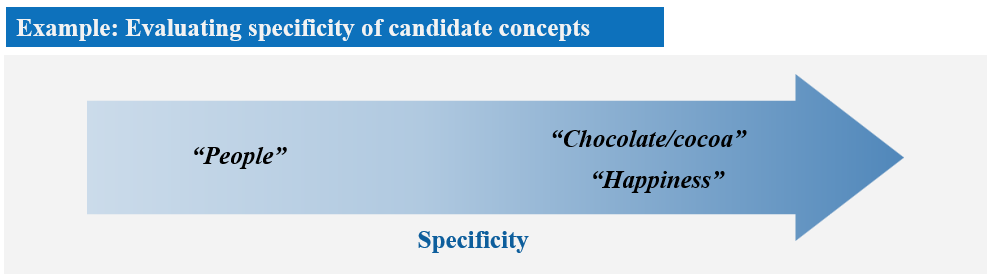
Specific concepts: Terms like “chocolate” and “happiness”, in our example, are promising candidates for main concepts/elements, since they are quite specific/distinct. Terms like "does", "consumption", or even "people", are less suitable, because they are quite general and frequently used throughout much of the literature.
Important concepts
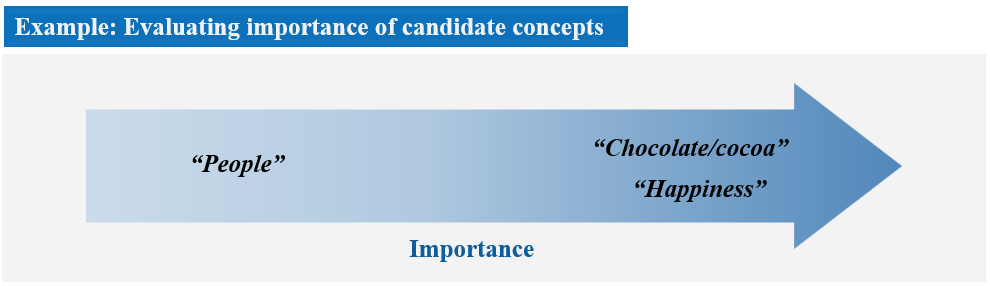
Important concepts: Terms that are highly likely to be mentioned in the title, abstract, or as author keywords, are considered Important and valuable. In our example, "chocolate" and "happiness" should be considered Important, since relevant literature on this topic is very likely to mention these, or related terms, in the title, abstract, or among the author keywords. Although "people" could also represent a candidate concept in our example, it is less Important, since it can be considered implicit that "chocolate" and "happiness" involves "people". Many literature records may therefore not necessarily mention “people” explicitly in the title, abstract or author keywords.
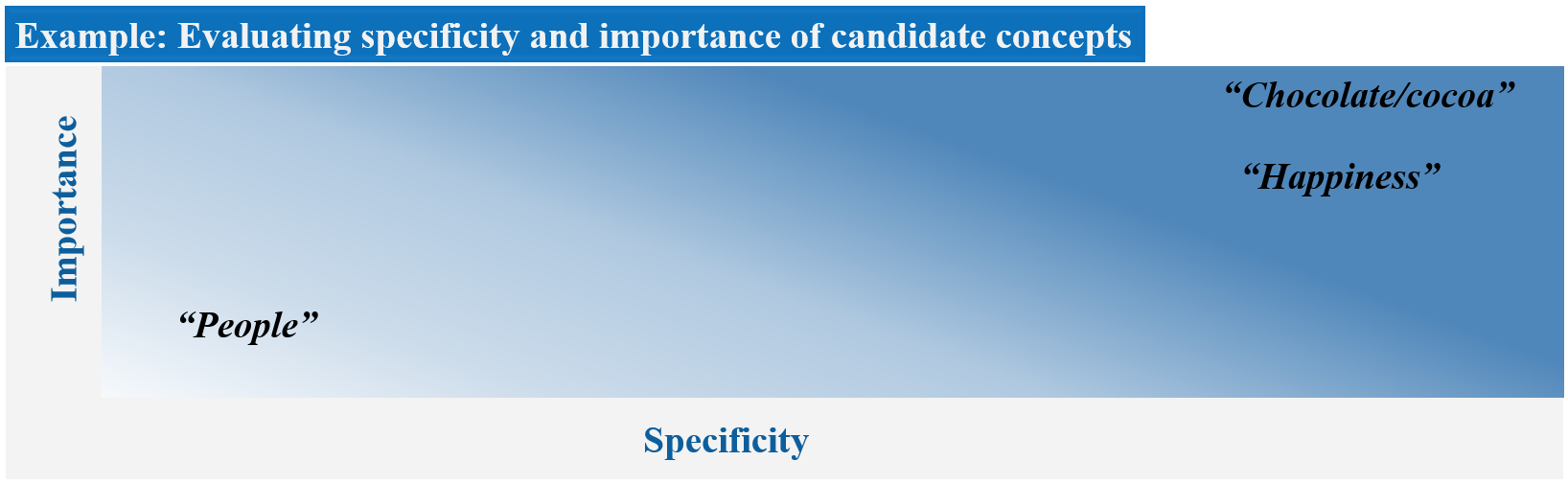
The ideal concepts for a structured search are both specific and important (i.e., highly likely to be mentioned in the title, abstract, author keywords) and thus situated in the top right corner area in the two-dimensional illustration above, where specificity and importance represents the two dimensions. In our example, "Chocolate" and "Happiness" are clearly the most ideal candidate concepts for a structured search on the topic. The combination of both low importance and specificity means that "People" should be discarded as candidate concept.
Biased concepts
Some candidate concepts can introduce unintended bias in a search. For example, using the term “improve”, as a main concept in our example, could return a subset of literature that is skewed towards positive findings of chocolate consumption on happiness. However, a balanced assessment should also seek to identify any literature that possibly failed to corroborate any connection between sense of happiness and chocolate consumption.
Overlapping concepts
Concepts that overlap in meaning/coverage can often result in a random loss of relevant literature. In our research question above, “chocolate” and “cocoa” clearly overlap in meaning, and should therefore be treated as one concept: “chocolate/cocoa”. Threating these terms as separate concepts would ignore any literature were both terms were not mentioned specifically in the title, abstract, or keywords.
Step 3: Explore – Map synonyms and related search terms
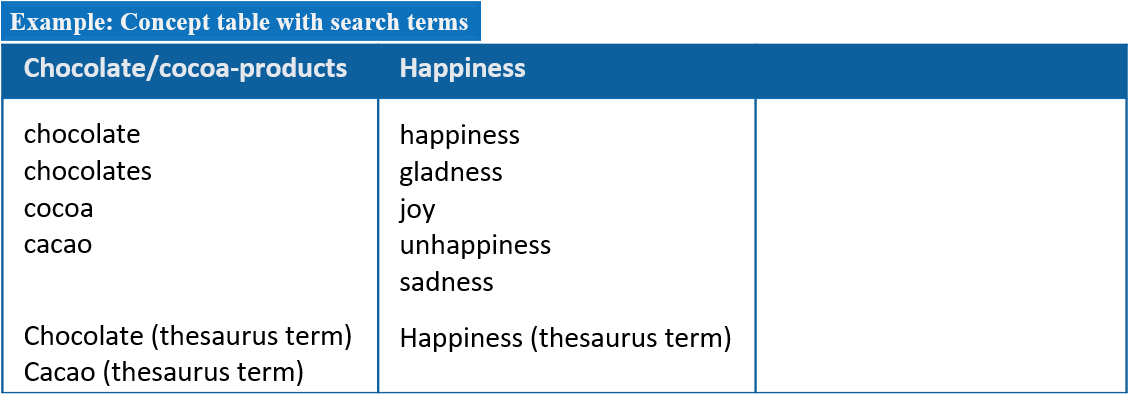
As part of a structured search, it is useful to construct a concept table, as illustrated above – one column assigned to each main candidate concept – where you try to list all the terms that should be searched as synonyms or related terms.
To find relevant Keywords, it can be helpful to check the range of terms that are often used in fields like the title, abstract and author keywords of relevant records. Even more alternatives can often be found by asking AI-based chatbots (e.g., ChatGTP, Copilot), or by consulting synonyms or alternative entries listed for relevant Thesaurus Terms. In addition to keyword terms, the concept table should also include any relevant Thesaurus Terms from Bibliographic Databases you plan to search.
Some important considerations for selecting search terms are listed below:
Plural and singular forms:
Try to cover both singular and plural forms when relevant (e.g., “chocolate” and “chocolates”. This can be solved by Truncation (e.g., “chocolat*”).
Spelling variations:
Try to cover alternative spelling forms when relevant (e.g., “behaviour” [British English] vs. “behavior” [American English]). This can be solved using Wildcards if supported by the database (e.g., “behavio?r”).
Acronyms
Common acronyms and abbreviations could be useful to cover (e.g., BMI for body mass index).
Antonyms
To maximize coverage, and avoid potential bias, it is sometimes also useful to include antonyms (i.e., terms with opposite meaning). In our example, it could be relevant to also include terms like “unhappiness”, and similar antonyms, for the term “happiness”.
Step 4: Mini searches - Build separate mini searches for each concept
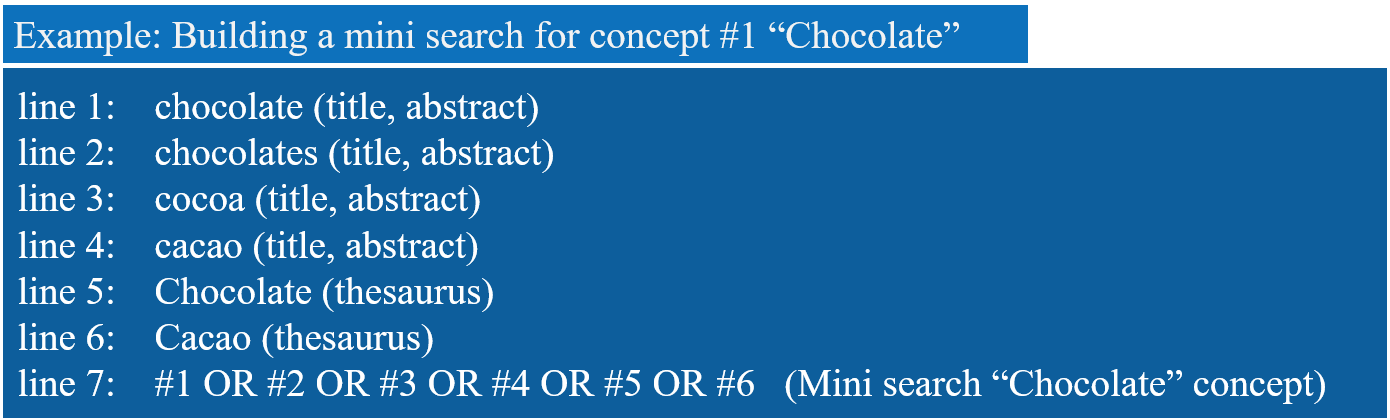
Start in a Bibliographic Database that is central to the topic and supports building complex search strategies based on combining search lines from the Search History. Create a separate mini search for each concept listed in the Concept Table as illustrated above.
Start with the fist concept and search each of the listed search terms – one at a time. It is recommended that you specify the search fields for each searched term – the most central fields are usually Title and Abstract (and author keywords if available). If the relevant databases also support Thesaurus Searching, these should be searched using the Thesaurus field (see line 5 and 6 in the example above).
When all the relevant terms for a specific concept have been searched for, complete the mini search by marking/selecting all the related search terms in the “search history” (i.e., line 1– 6 in the example above), and combine them using the OR operator (see line 7 in the example above). Repeat the process for each candidate concept.
Step 5: Complete the initial search
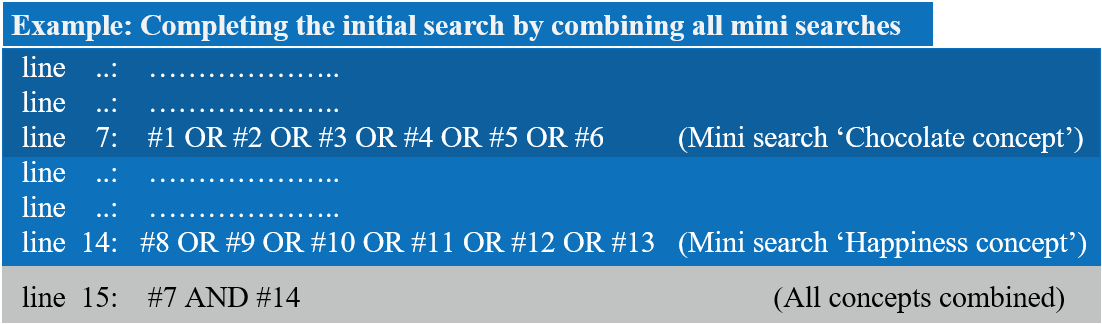
Complete the initial search by selecting/marking the mini searches for each concept (i.e., line 7 and 14 in the example above), and combine them using the AND Operator (see line 15 in the example above).
Step 6: Improve the search
Inspect and evaluate the literature identified in your initial search. Some important considerations include:
Filtering and Sorting
A long list of search results may be hard to browse and evaluate or simply too time consuming to go through. Sorting and/or filtering the list might be useful.
You can sort results by:
- year of publication
- title
- relevance
Here, relevance relates to the occurrence, and the frequency of occurrence, of your particular search terms in the title, keywords, abstract, full text and, if selected, your personal field of research. - number of times cited
The number of times a document has been cited is often understood to reflect its influence or impact. This gives an indication of how often the document has been read by researchers in the field. Some resources offer options for Reference Tracing and for sorting by "times cited". Keep in mind that the number of citations is not necessarily a measure of quality or importance. You can read more about this in the section on Citations and evaluations.
You can filter results by:
- subject
This may help you sort according to relevance. - author
This option can provide you with key authors (or more peripheral ones) in the field. - publisher and journal
This provides you with the names of key publishers and journals. - date of publication
The date filter allows you to select the most recent publications, or those from a specific period. - library or database holdings
This lets you know what your library and other cooperating libraries have, or what specific databases contain.
Recovery
Is any relevant literature missing in the search results? If so, diagnose the root cause by inspecting the type of terms used in the title, abstract or thesaurus fields of the missing records. Make the necessary modifications to the search terms and repeat the search until you are satisfied with the result.
High or low number of results:
If the number of results is quite low, you can try to remove the least specific concept(s) (e.g., the “People-concept” in our example) from the search. Alternatively, if the number of results is too high, consider if it is possible to add an extra main concept to the search (e.g., a concept focusing on country, study design, population, to name a few options).
Step 7: Adjust to other databases
Decide what other Bibliographic Databases to include in the final search and make the necessary adjustments (e.g., wildcards, proximity operators, thesaurus terms). The number of required databases varies depending on the purpose. It is generally recommended to search in at least two that are complementary to each other, but Systematic Reviews, and other types of comprehensive knowledge overviews, may require searching in all the central subject specific databases. Minor adjustments of the search may be necessary due to different availability of various search fields, alternative Thesaurus System and different use of Truncation, Wildcards or Proximity Operators.
Save the search in the different databases and copy the final search history into a document, in case you need to modify or document the search at a later stage.
Example: Medicine
Research question: Are light therapy treatments effective against winter depression?
Database: PubMed (Medline). Relevant in biomedicine, life sciences and social sciences.
Divide your search into several steps and combine results afterwards. When searching literature in medicine and health, make use of subject headings in the MeSH thesaurus.
Step 1: Searching for “winter depression”
The MeSH term for this is seasonal affective disorder. In Scandinavia, this condition is commonly called winter depression, which is mentioned in a few abstracts. The terms are combined with OR to retrieve articles in which either is mentioned. The list below shows search terms[field searched] and numbers of results. Searches are marked with the hash symbol ( # ) in PubMed.
Search 1: seasonal affective disorder[MeSH Terms] 1215
Search 2: "seasonal affective disorder"[Title/Abstract] 1264
Search 3: "winter depression"[Title/Abstract] 281
Search 4: #1 OR #2 OR #3 1744
Step 2: Searching for “light therapy interventions”
The correct MeSH term for light therapy intervention is phototherapy and this is combined with light therapy in the title and abstract as a synonym. Additional searches for the terms in titles or abstracts here add a few relevant articles. They are all combined with OR to retrieve articles in which either term is mentioned.
Search 5: phototherapy[MeSH Terms] 41845
Search 6: phototherapy[Title/Abstract] 8512
Search 7: "light therapy"[Title/Abstract] 2093
Search 8: #5 OR #6 OR #7 45782
Step 3: Combining search results
Finally, both sets of terms are combined with AND. This will retrieve a combination of the words above.
Search 9: #4 AND #8 771
Step 4: Limiting search results
Now you have 771 references to articles concerning your search terms. If you want to further decrease that number, you can limit the result, for example by study design. Reviews summarise previous research and may be a good starting point. In this case, by limiting to reviews, you will retreive 162 studies.
Search 10: (# 9) Filters: Review 162
In addition, limiting by year of publication will reduce the number of studies even further. There are 35 reviews published in the last ten years.
Search 11: (# 9) Filters: Review; published in the last ten years 35
Example: Biology
Research question: How is the symbiotic relationship between Lepiotaceaean fungi and leaf-cutter ants?
Database: BIOSIS Previews, which is a part of Web of Science. Relevant for the life sciences.
Divide your search into several steps; search separately for relevant keywords according to research topic; combine and refine afterwards.
Step 1: Searching for leaf cutter ants and Lepiotaceaea fungi
Make sure to include various spellings and relevant synonyms of a search term. In this case, Latin names and common names are combined in a Boolean OR search. Add a wildcard (here *) to the stem of a word to include all forms. In BIOSIS, searching by topic means searching by title, abstract or keywords. The list below shows search terms and number of results in parentheses.
Search 1: Topic=(Atta OR Acromyrmex OR ("leaf cutt* ant*") OR ("leafcutt* ant*")) (1529)
Search 2: Topic=(fungus OR fungi OR lepiotaceae*) (488401)
Step 2: Combining search results
Go to your search history and combine the previous two searches with the Boolean operator AND. Searches are marked with the hash symbol (#) in BIOSIS.
Search 3: #1 AND #2 (385)
Step 3: Refine results to type of work
The left panel in the result list of the search interface lets you refine your search. Reviews summarise previous research and may be a good starting point. Choose Literature Types and tick off Literature Review if you would like to start with the eight papers retrieved in our example.
Search 4: Refined by: Literature Types=(LITERATURE REVIEW) (8)
Conclusion:
For our topic Symbiotic relationships between Lepiotaceae fungi and leaf-cutter ants, a total of 385 documents were retrieved in BIOSIS(Step 2).
While it is tempting to include a third search concept, symbiosis, this would exclude the documents dealing with symbiosis without mentioning it in the title, abstract or keywords. If a paper is about both fungi and ants, it is also likely to relate to symbiosis. In other words, this might increase the specificity of the search, but at the same time reduce the sensitivity.
For an initial check on the relevance of the retrieved documents, try browsing titles, year of publication, contributing authors and the journals involved. As no database is exhaustive, consider including searches in other databases. Keep revising your search strategy and also consider setting up an alert.
Example: Psychology
Research question: The impact of having divorced parents on self-esteem in adolescents.
Database: PsycINFO (Ovid). Relevant for psychology, health sciences, social sciences and education.
Divide your search into several steps. Identify the main concepts in your research question and search separately for relevant keywords for each concept. In this example, the main concepts are self-esteem, adolescents, and divorced parents. Individual searches for main concepts and synonyms / alternative spellings of search terms within a main concept are combined. You can then consider using various possibilities to refine your search result.
Step 1: Searching for “self-esteem”
Make sure to include various spellings and relevant synonyms of a search term or search concept. You might want to consider whether the concepts “self-respect” and/or “self-confidence” ought to be included. Many databases treat the spelling alternatives “self esteem” and “self-esteem” identically. It is recommended that you check if both alternatives need to be included. It is also easy to test whether a search term consisting of more than one word should be delimited with quotation marks.
Check the thesaurus for possible subject headings that match your main concepts well enough to be included as keywords. In PsycINFO (on Ovid), a subject heading search will be marked with a slash (/) in the search history. The Search History in the database presents the individual searches representing the main concept, “self-esteem”, and you combine them using the Boolean operator OR. The list below shows spelling variants of “self-esteem”, field searched (ti,ab = title, abstract), and the numbers of results in parentheses.
Search 1: self-esteem.ti,ab. (41932)
Search 2: selfesteem.ti,ab. (83)
Search 3: self esteem/ (24471)
Search 4: Search 1 OR Search 2 OR Search 3 (46039)
Step 2: Searching for adolescents
Truncating after the "n" in adolescen* will include adolescent, adolescents and adolescence. Truncating after the "n" in teen* will include teens, teen-ager/-s and teenager/-s.
You might also want to consider including the search terms youth*, “young people” and student*.
Search 5: adolescen*.ti,ab. (220286)
Search 6: teen*.ti,ab. (20825)
Search 7: adolescent development/ (45687)
Search 8: Search 5 OR Search 6 or Search 7 (236189)
Step 3: Searching for divorced parents
Truncating after the "e" in divorce* will include divorced (which will also identify “divorced parents” and “parents who are divorced”). Including terms other than divorce might be a good idea if it is unimportant that the parents were married before they broke up. PsycINFO allows for truncation within a compound search term, such as “parent* breakup” which will include parental breakup, parents breakup and parent breakup. The searches representing the concept of “divorce” are combined with OR (Search 14).
Search 9: divorce*.ti,ab. (16833)
Search 10: “broken home*”.ti,ab. (528)
Search 11: “parent* breakup”.ti,ab. (10)
Search 12: “parent* break-up”.ti,ab. (15)
Search 13: divorce/ (8244)
Search 14: Search 9 OR Search 10 OR Search 11 OR Search 12 OR Search 13 (18194)
Step 4: Combining search results
Go to your search history and combine previous searches with the Boolean operator AND.
Search 15: Search 4 AND Search 8 AND Search 14 (106)
Step 5: Refining results to type of work
You can refine your search by choosing Additional Limits. If, for example, you want to identify the reviews among your search results, choose the Methodology box and mark the following options: 0800 Literature Review, 0830 Systematic Review, 1200 Meta Analysis and 1300 Metasynthesis. Limiting our research question by these types of applied methodology retrieves 3 documents.
Search 16: limit 15 to (0800 literature review OR 0830 systematic review OR 1200 meta analysis OR 1300 metasynthesis) (3)
Conclusion
For our research question “The impact of having divorced parents on self-esteem in adolescents”, a total of 106 documents were retrieved in PsycINFO (Step 4) . Keep revising your search strategy and consider setting up an alert. As no database is exhaustive, consider including searches in other databases.
Example: Education
Research question: What is the teacher's role in supporting play in the kindergarten?
Database: ERIC (Ebsco). International database on education literature and resources.
Divide your research question into several concepts, search for them separately, and make use of the search history to combine results afterwards. When searching for literature in a database that has its own thesaurus, remember to make use of relevant thesaurus terms, also called subject headings.
Step 1: Searching for “kindergarten teacher”
When typing "kindergarten teacher" into the thesaurus, we learn that "Preschool teachers" is the correct subject heading. Therefore we first apply that in the field Descriptors [exact] (DE).
When searching the fields Title and Abstract (and Author keywords when available) - both “Kindergarten” and “Kindergarden” can be used, as well as “Preschool”, “Daycare”, “Child care center” and “Nursery”.
In search 2, each of these terms is combined with the Boolean operator OR, to retrieve articles where either is mentioned. They are then combined with a proximity operator (N8), saying that the word “teacher” should be found within 8 words' distance. All the words end with an asterisk, opening for any character following. For instance, nurser* includes nursery and nurseries. The same search string is used in the fields Title (TI), Abstract (AB), and Keywords (KW). Each string is enclosed within parentheses, which are combined with OR.
Then we combine Search 1 and Search 2 with OR.
| Search number | Field searched (abbreviation) and search terms | Number of hits |
S1
| DE “Preschool Teachers” | 7574 |
| S2 | TI ( (Kindergarten* OR kindergarden* OR preschool* OR daycare* OR "child care center" OR nurser*) N8 teacher* ) OR AB ( (Kindergarten* OR kindergarden* OR preschool* OR daycare* OR "child care center" OR nurser*) N8 teacher* ) OR KW ( (Kindergarten* OR kindergarden* OR preschool* OR daycare* OR "child care center" OR nurser*) N8 teacher* )
| 8124 |
| S3 | S1 OR S2
| 12714 |
Step 2: Searching for “Play”
The thesaurus term is “Play”. Other terms like: Role Play, Playground activities may be considered, but are not included here.
We would also like to find articles with “Play” in the title, abstract or author keywords. We add an asterisk (*) to include different variations of the word (plays, played, playing), and again we search for the same thing in different fields, which we then combine with OR.
| Search number | Field searched (abbreviation) and search terms | Number of hits |
| S4 | DE “Play” | 9071 |
| S5 | TI play* OR AB play* OR KW play* | 75177 |
| S6 | S4 OR S5 | 76294 |
Step 3: Combining search results
Finally, both sets of terms are combined with AND. This will retrieve a combination of the words above.
| Search number | Field searched (abbreviation) and search terms | Number of hits |
| S7 | #3 AND #6 | 1755 |
Step 4: Limiting search results
Now you have 1755 references to articles concerning your search terms. If you want to decrease that number, you can limit, for example by study design or year of publication. Limiting to references from 2018–2021 will retrieve 292 studies.
Conclusion
For an initial check on the relevance of the retrieved documents, browse titles and abstracts. Look for any other relevant search terms. Keep revising your search. When you are satisfied with the search, consider saving it and setting up an alert. As no database is exhaustive, also consider performing searches in other databases.
Library support for structured searching
For further input and advice on systematic searching, consult your library help pages on databases and literature searching. Some libraries offer courses in systematic searching, and some may even offer to provide such searches for you on request.
Managing searches and references
Saving and Rerunning Searches
Saving searches can help you avoid unnecessarily repeating searches you have done earlier. You can also edit and re-run searches if you have saved them.
To save the searches you have performed, and any document records that you want to keep for later, you need to register and create a profile in the database. Registering will also allow you to set up alerts to let you know when new results matching your queries appear. Think carefully about how you do this. It can be useful and time-saving to have the technology work for you and feed you new articles within your research area, but if you have too many alerts it may quickly become a source of distraction and frustration, rather than inspiration.
Keeping a Log of Your Searching Activities
Even though you may find many of the automatized functions in resources used for searching convenient and time-saving, you should also keep a personal record of your searching activities. If you make a note of the databases you have searched, the search strategies used, the dates of the searches, the results you retrieved, and the challenges encountered, you will likely avoid becoming frustrated over duplication of effort. Also, in certain cases (e.g., scoping- or systematic reviews, knowledge summaries), you will be required document the search process in detail.
Reference Management Tools
All the different resources used for searching also have functionality for exporting references to reference management tools. Some databases let you export references directly to your reference management tools, while others require that you first receive an email with the references. It is a matter of personal preference where and how you share, store and organise your references. However, we recommend using a reference manager.