
The number of different approaches to identify relevant literature is almost limitless – with the recent advances of AI and LLMs, even more possibilities have become available. Generally, the optimal strategy depends on your academic discipline and topic of interest. Your needs are likely to change throughout the successive stages of a project – so will your approach!
In this page you will learn about:
- Relevant Sources
- Search Tools
- Classical Searching
- AI-based Searching
- Citation Tracing
- Literature Mapping
- Access and support services at your library
Relevant sources
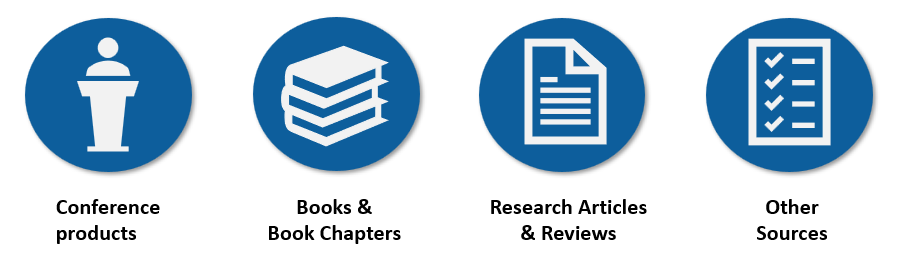
When starting out, it is useful to first consider the type of sources that could be relevant to your project. This will help inform what type of search engines and databases that are best suited to find the relevant literature and ultimately reach your goals.
Conference Products
New findings, preliminary results and information about ongoing projects are usually first presented at conferences. This typically involves publication of abstracts and conference papers that often can be found by searching in Academic Databases. Digitized posters and recorded presentations are often hosted on conference websites, pages of individual researchers, or in various Repositories. The latter sources are therefore often easiest to find using web-based search engines like Google.
Books and Book Chapters
Books and Book Chapters represent the most central format for research output within some academic fields (e.g., social sciences and humanities). They are typically written by topic experts within a field and often go through a peer review process prior to publication. While Books and Book Chapters can be found using web based Search Engines like Google, these sources often tend to drown among commercial offers, book review and various other non-scholarly content. For this type of source, Google Books, Bibliographic Databases and searchable Library Catalogues (e.g., Oria) present better search alternatives.
Research Articles and Review articles
Research articles represent the most important type of scholarly output within many fields. Review Articles are usually published alongside the former and represent a great way to get a quick overview of the field. Both types of sources go through a peer review process prior to publication and are most conveniently found by searching in Academic databases. In addition, authors sometimes publish a preliminary draft of the paper in various Repositories.
Other Source Types
Some types of sources are published outside the traditional scholarly publishing landscape. Organizational reports or government documents are examples of “grey literature” that could be important for describing or justifying your research. Although a few databases are dedicated to cover “grey literature”, web-based Search Engines like Google are often useful search tools for this type of literature. Standards, patents and experimental protocols also play important roles within some disciplines and usually have dedicated databases with access provided by your library.
Search tools
Below we describe some of the main types of tools and sources typically used when searching for literature.
Search engines
While academic sources are generally preferred for scholarly work, information or non-academic materials are sometimes required. Web-based Search Engines can be useful for finding news or public information from various organizations and agencies (“grey literature”). In such cases, search engines (e.g, Google) can be very effective. “Googeling” the title of a specific academic literary source of interest is also often a highly effective way to find freely available full text versions of journal articles and various other sources you want to read.
Academic Databases
Academic Databases focus on academic literature and usually provide more advanced search functionality compared to web-based Search Engines. Databases can be interdisciplinary (e.g., Google Scholar, BASE (Bielefeld Academic Search Engine), Web of Science, Scopus, Dimensions, Jstor) or subject specific (e.g., PubMed (health), ERIC (education), Juridika (Law)). The interdisciplinary databases usually support Citation Tracking, while the field specific ones often support Thesaurus Searching – aiding both recall and precision. Finally, most academic databases support building Structured Searches – allowing complex search strategies and ensuring reproducibility through proper documentation. Although academic databases are primarily based on Keyword Searching and Boolean operators, many have now also started to integrate AI-based approaches like Semantic Search into their repertoire.
While most Academic Databases are subscription-based, many are often provided by the library at your institution. For more information, see the section below on Access and Support Services at Your Library.
Google Scholar
Google Scholar is by a large margin the largest database for scholarly and academic content and probably also the most widely used tool for finding scholarly work. It is freely available and often provides direct links from sources to your library’s holdings – thus aiding access to literature provided by your library but located behind paywalls (may require linking your institution’s library to Google Scholar under “settings”). This resource is often considered to be a search engine but also supports Citation Tracking like Academic Databases. Although mostly used for more basic searching, more sophisticated Structured Searching is possible, although in a somewhat more limited form than many other bibliographic databases.
Despite its’ popularity, Google Scholar has some important limitations:
- The indexing curation in Google Scholar is often less accurate than among the commercial competitors.
- The result ranking in Google Scholar is heavily influenced by popularity – browsing beyond the first few result pages can therefore pick up relevant literature ranked low by mistake.
- The algorithms used to identify and rank the results in Google Scholar are non-transparent and affected by your previous search history.
- Google Scholar only supports a single line search query of up to 256 characters and the search result is limited to the 1000 most relevant records.
Library catalogues
Your institution’s library usually provides a catalogue that allows you to search in selected collections (e.g., the holdings of one, or more libraries), check availability, and access or order literature in various formats. In Norway, most university libraries use a search interface system called Oria.
Many libraries (and museums, organisations and institutions) provide collections and archives that are — to some extent — also available online. They are sometimes picked up by search engines and can often be searchable through a library catalogue. In some cases, you may have to access such resources directly, often via the website of an institution or a project portal.
For more information, see the section below on Access and Support Services at Your Library.
Repositories
Institutional- and open Repositories allow researchers to share published or unpublished scholarly output (e.g., pre- or post-prints). The content of these repositories is often picked up by Search Engines and Academic Databases. Examples of open Repositories include Figshare, Open Science Framework (OSF), arXiv (paper server for mathematics, physics, astronomy, electrical engineering, computer science, quantitative biology, statistics, mathematical finance, and economics), bioRxiv (paper server for biological sciences), SocArXiv (paper server for social sciences), Europe PubMed Central (Europe PMC).
Classical searching
The Classical Searching approach finds relevant literature by matching selected Keywords, sometimes also Thesaurus terms, to specific words in the fields of document records using Boolean logic and various search techniques. Central aspects of this approach are covered under the headings presented below.
Keyword Searching

Keyword searching, also known as lexical searching, represents the classical searching approach. This involves matching important terms – hence the term “keywords” – to identical words within the indexed fields of a document record (e.g., fields like author, title, abstract, subject). For example, if your search term is “chocolate”, document records containing the term “chocolate” in any of searched fields are retrieved.
Many search engines and databases also support linguistic normalization during indexing of their document records. They may also automatically optimize your search query using techniques like auto stemming (automatic truncation) of your entered keywords (i.e., reducing words to their root form like converting “running” to “run”) or lemmatization (i.e., reducing words to their dictionary form [e.g., converting “better” to “good”]).
Advantages
- Good precision and specificity (by focusing on fields like title and abstracts, where the most essential information is provided, matched records will typically be quite relevant)
- Intuitive process and predictable results
- Structured Searching which is employed in Systematic Searching is primarily based on Keyword Searching.
Limitations
- Does not usually search within the whole full-text. Searching for detailed information unlikely to be mentioned in the title and abstract is therefore better suited to Full-Text Searching.
- Relys on exact matching of terms – synonyms, related terms, variable spelling or misspelling are not necessarily taken into account.
- Synonyms and variable language often require Combining Keywords and various search techniques like Truncation, Phrase searching, and Proximity searching.
- Does not consider that words often change meaning depending on context. For example, river “bank” and financial “bank” have different meaning. Such consideration of contextual meaning is now possible through AI-assisted search approaches like Semantic Search.
Full-Text Searching
Full-Text Searching is a form of Keyword Searching where keywords are matched to all the terms used within the entire full-text of documents, and not restricted to specific fields like the title, abstract, keywords and more. Most Full-Text Searching tools also incorporate natural language processing features, with basic ability to distinguish homonyms based on context. For example, based on the contextual information, natural language processing can infer that “Apple released a new iPhone” refers to the company and not to the fruit.
Advantages
- Can find information hidden deep within the full-text of a record.
- Less sensitive to variable language and alternative word forms.
Limitations
- Searching within the full text retrieves any record that accidently mention your keyword anywhere in the text. This tends to produce high numbers of retrieved results that may be of low relevance and therefore time consuming to explore.
- Long documents tend to be prioritized over shorter ones, because they contain more instances of the searched keywords.
- Lack the level of contextual understanding offered by Semantic Searching.
Boolean operators
The use of the operators AND, OR and NOT, called Boolean logic, helps you to combine several terms into a search string.
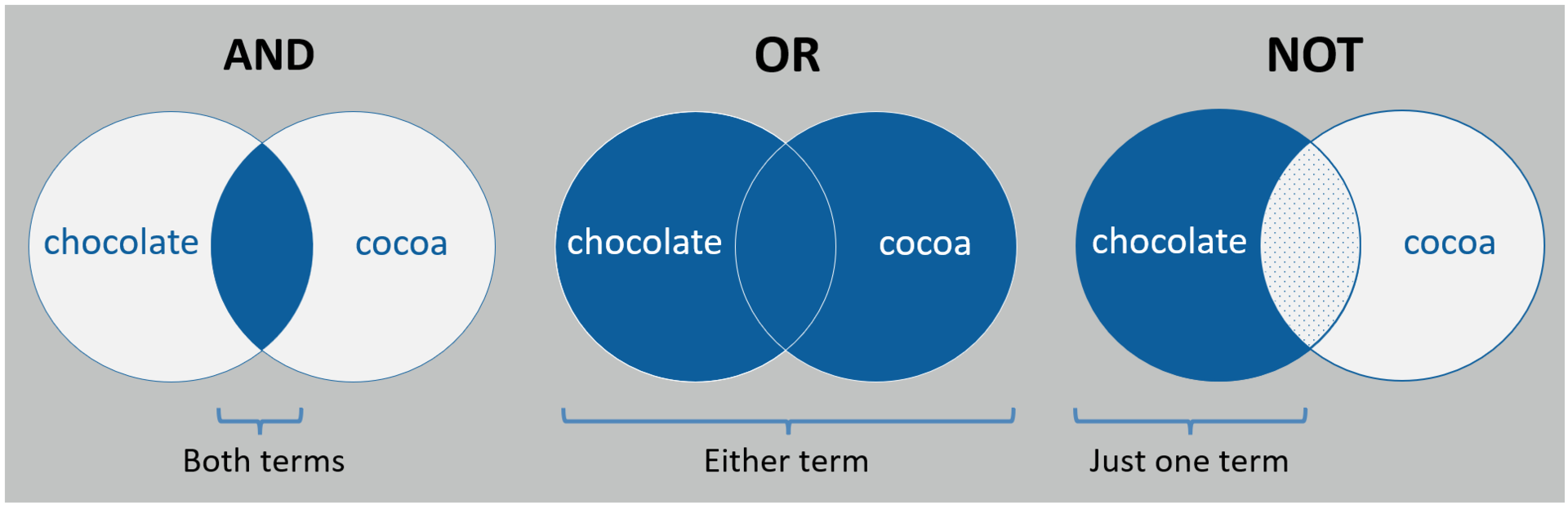
AND Operator
The AND operator is used to narrow a search, by requiring that all keywords combined with this operator must be present in the search results (i.e., both “chocolate” and “cocoa” in the illustration above). The more keywords you combine with AND, the more specific your search query will be, and the fewer results will ultimately appear in your results list. In Structured Searching, AND is frequently used combine different concepts.

Entering several keywords into a search field normally implies that they should all be present in the matched results and are therefore automatically processed by the search interface by combining the keywords with the Boolean operator AND. In the example above, writing “chocolate happiness” in the search field is therefore automatically processed as a search for “chocolate AND happiness” by the search interface.
OR Operator
The OR operator is used to expand a search, by returning results where at least one of your alternative keywords appears. This technique is used to include synonyms and related terms to also capture relevant records where alternative terms are used. The more keywords you combine with OR, the more records will appear in your search results.

The terms “chocolate” and “cocoa” are often used as alternative terms in the literature. In the example above, combining the two terms using the OR operator ensures that literature mentioning either one, or both, is captured in the search.
NOT Operator
Combining keywords with NOT will exclude literature with the specified search term(s) from your search result. Use the NOT operator with great caution – if even at all – as you run the risk of excluding relevant results unintentionally.

Why is the NOT operator so risky to use? Suppose that you are primarily interested in literature on “chocolate” but prefer to avoid records focusing on “cocoa”. In the example above, searching for “chocolate NOT cocoa”, removes all records mentioning the term “cocoa”. However, this also means that even records primarily focused on “chocolate”, that by chance also happen mention the term “cocoa” (i.e., the shaded overlapping part of the circles), will become lost from your search results.
Search strings

Several keywords can be combined to build complex Search Strings, by enclosing your search terms in parentheses, and using Boolean Operators. In the example above, records are returned if either the keyword “chocolate” or “cocoa” appear together with “happiness”.
Remember that search terms placed within the inner parentheses are searched and combined first. Example: ((chocolate OR cocoa) AND (happiness OR gladness OR joy))
Thesaurus Searching
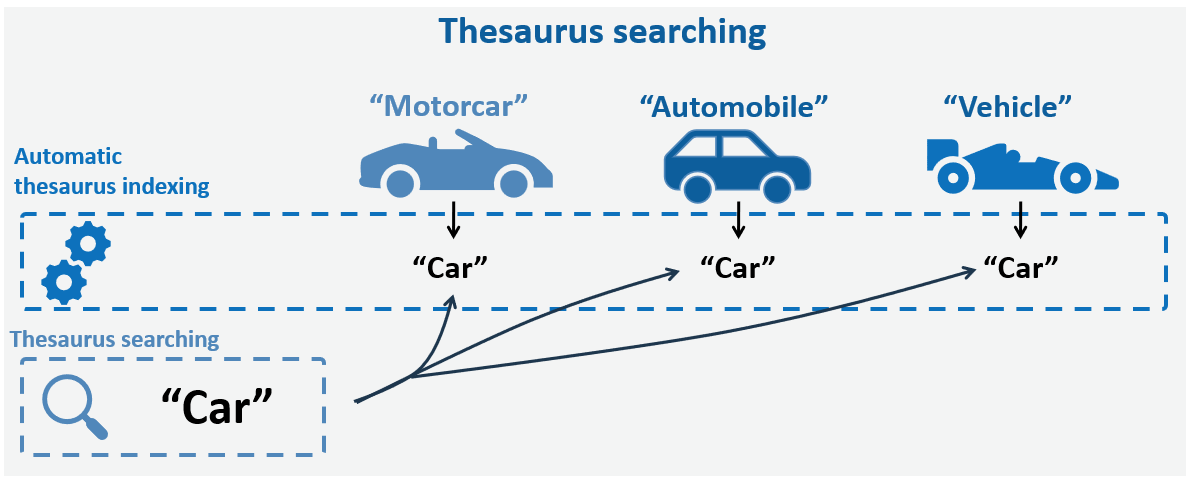
Subject Specific Databases often support Thesaurus Searching based on a standardized controlled vocabulary. The Thesaurus Terms serve as "tags" that are automatically assigned to document records based on important concepts and themes covered in them. Thesaurus Term systems are usually specific to the databases (e.g., MeSH thesaurus in PubMed/MEDLINE and ERIC thesaurus in ERIC). The terms are organized in a hierarchical fashion (i.e., specific terms are organized below more general terms) and therefore represent a type of ontology-based searching. For example, the subject term "Leisure activities" is tagged on items treating such activities in the database Medline. The hierarchy of "Leisure activities" includes narrower subject terms like "Holidays", "Recreation", "Dancing", "Sports", and more.
Due to superior recovery of relevant records, Thesaurus Searching is considered an obligatory requirement (if available in relevant databases) of a proper Structured Search for Scoping reviews and Systematic Reviews.
Advantages
- Including relevant Thesaurus Terms makes a search less sensitive to use of variable language and alternative word forms – ensuring higher recovery of relevant records.
Limitation
- Only supported in subject specific databases.
- Novel or unusual topics may not have suitable thesaurus term options.
- Requires exploring the thesaurus system organization and architecture.
Some databases that include a thesaurus
- ERIC (ERIC thesaurus (subjects))
- Sociological Abstracts (Sociological thesaurus (subjects))
- PsycINFO (Thesaurus of psychological index terms)
- PubMed, MEDLINE, Cochrane Library (Medical Subject Headings – MeSH)
- Embase (Emtree terms)
- CINAHL (CINAHL headings)
- Compendex (Engineering Index Thesaurus)
- ASFA
- GEOREF
- MLA International Bibliography (MLA Personal Names Thesaurus and MLA Subjects Thesaurus)
- The Philosopher's Index Thesaurus
Truncation
Truncation involves using a symbol (usually an asterisk *) at the end of a word’s root to simultaneously search for terms with different endings. The use of truncation symbol might vary between databases so check the help of FAQ section if you are unsure.
Example: Searching for the word stem child* matches child, children, childish, childhood, etc.
Wildcards
Wildcards use symbols to replace characters within a word to account for different spellings. Words are sometimes spelled differently, typically between variants of British and American English. The symbols and their function vary between databases so check the help of FAQ section if you are unsure.
Example: Searching for colo?r matches both color (American English) and colour (British English).
Phrase searching
When you search for a specific phrase, you usually enclose the phrase with double quotation marks “…”. This narrows your search to those exact words in that specific order. Examples: “United Nations” and “breast cancer”. Note that not all search interfaces interpret double quotation marks in this manner, and if you are in doubt, check the help menue or FAQ section.
Proximity operators
Proximity operators let you search for keywords that are located within a specific distance of one another and/or in a particular order. This may indicate a connection between them, as in words that often are used together but that are not fixed expressions.
Most databases have proximity operators, but they vary from one database to the next. You can often specify the order of words and the number of words that can separate them. The following are some examples:
- NEAR = near operator. Add a number to define how many words may separate your search words. Example from Web of Science: tax NEAR/5 reform retrieves hits containing the words tax and reform within a five-word distance.
- N = near operator. Retrieves hits containing the words regardless of the order in which they appear. Add a number to define how many words may separate your search words. Example from EBSCOhost: SocIndex: tax N5 reform finds records containing the words tax reform as well as reform of income tax.
- W = within operator. Retrieves records with the words in the order you entered them. Add a number to define how many words may separate your search words. Example from EBSCOhost: SocIndex: tax W8 reform finds records containing tax followed by reform within 8 words, but not e.g. reform of income tax.
- ADJ = adjacent operator. Retrieves records with the words regardless of the order in which they appear. Add a number to define how many words may separate your search words. Example from Ovid SP: Medline: tax ADJ4 reform retrieves tax reform as well as reform of income tax.
- AROUND (#) = proximity operator. Retrieves records with search terms that are within a specified distance (#) from each other. Example from Google Scholar: sleep AROUND(2) deprivation retrieves “sleep deprivation” as well as “deprivation of sleep”.
Search history
Long and complex search strings can be difficult to understand and interpret. However, most databases display your recent Search History and lets you build new searches by combining previous search lines based on Boolan Logic. A more detailed description and some more advanced examples are provided in the Structured Searches section.
Example:
Search 1: chocolate OR cocoa
Search 2: happiness OR gladness OR joy
Search 3: Search 1 AND Search 2 (combining Search 1 and Search 2).
Filtering and sorting
A long list of search results may be laboursome to browse and evaluate. Sorting and/or filtering the list may be useful.
Sorting options
- year of publication
- title
- relevance
Here, relevance relates to the occurrence, and the frequency of occurrence, of your particular search terms in the title, keywords, abstract, full text and, if selected, your personal field of research. - number of times cited
The number of times a document has been cited is often understood to reflect its influence or impact. This gives an indication of how often the document has been read by researchers in the field. Some resources offer options Citation Tracing and for sorting by "times cited".
Result filtering options
- subject
This may help you sort according to relevance. - author
This option can provide you with key authors (or more peripheral ones) in the field. - publisher and journal
This provides you with the names of key publishers and journals. - date of publication
The date filter allows you to select the most recent publications, or those from a specific period. - library or database holdings
This filtering option lets you know what your library and other cooperating libraries have, or what specific databases contain.
Searching for authors
When you search for records from a specific author, be aware that author names may be presented differently across databases. Full names might not be provided, for instance; they may be listed with last name and initials and be searchable only as such.
For the most complete result, the safest strategy is to search for all possible variations of a name. Techniques like Truncation and Wildcards can be used to cover different types of spelling.
- Spaces, apostrophes or hyphens:
Search both O’Leary and OLeary for the author O’Leary. - Different alphabets:
Search Grønås, Gronas or Gr*n*s for the author Grønås. - Namesakes/homonyms:
People with common names are difficult to distinguish from each other – especially if only the last name and initials are provided (e.g., Smith K.). Some databases group authors by affiliation and research area, making it easier to find the right author. - Spelling mistakes and differing conventions:
The same author can appear with numerous versions of their name due to errors, conventions or even name changes. If the database suggests a list of author names, you may have to select several variants to capture all records from the same author.
AI-based searching
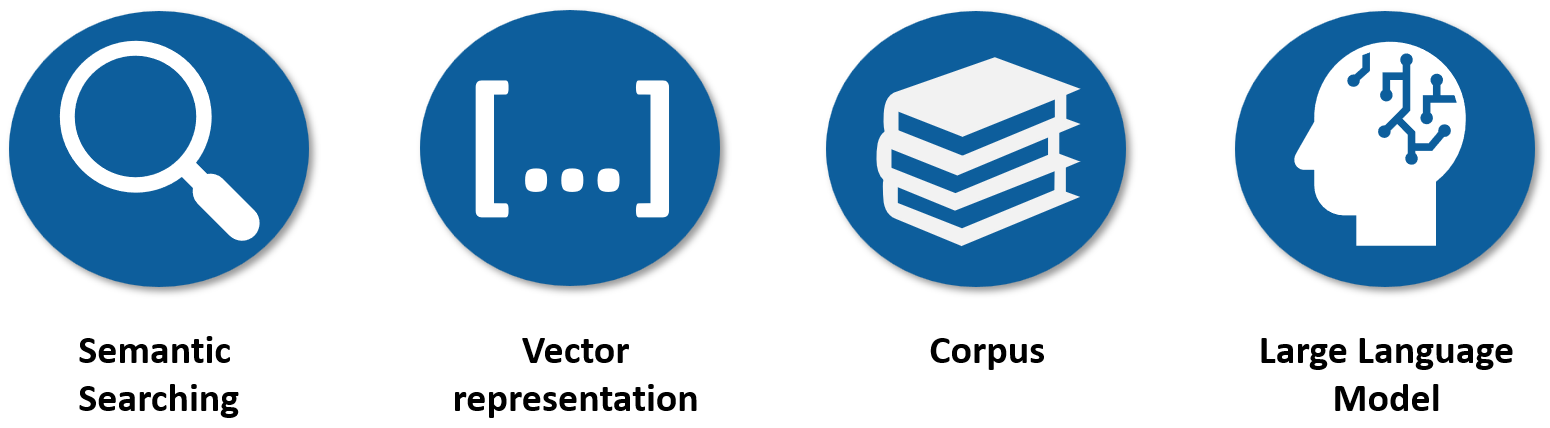
With the recent advance of AI and Large Language Models, searching based on natural language have now become available in the form of Semantic Searching.
AI-based Semantic Searching
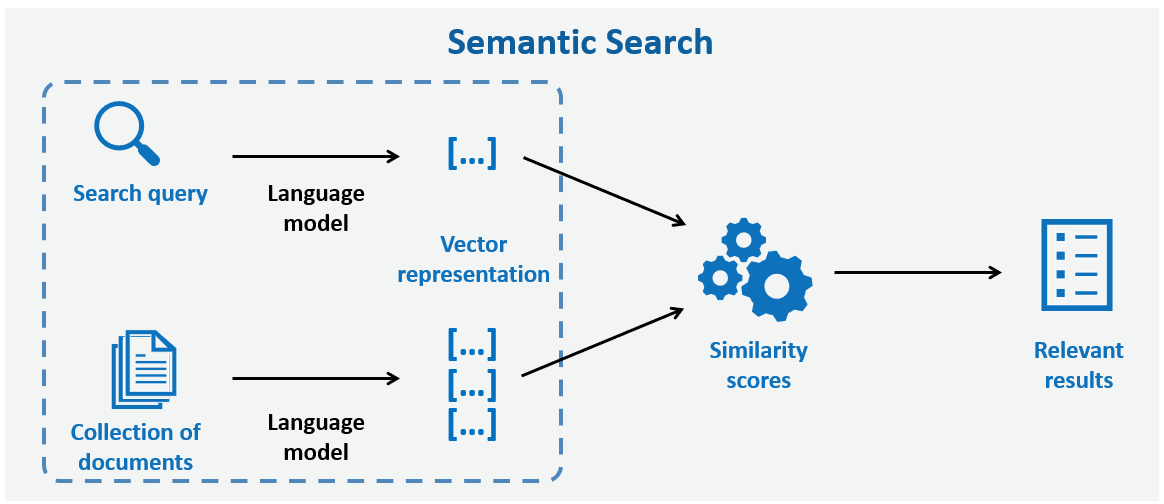
AI-based Semantic Searching involves searching with natural language using AI-based Large Language Models (LLMs). In addition to forming the basis of AI-chatbot tools (e.g., ChatGTP, Copilot), this approach and various extra AI-based features are rapidly becoming integrated into new (e.g., Google’s Scholar Labs) and existing tools specialized for literature searching (e.g., Scopus AI and Web of Science AI).
In AI-based Semantic Searching, a pretrained Large Language Model (LLMs) converts text into strings of numbers (vector representations) that store large amounts of complex information about the meaning and context. Rather than carefully selecting and entering keywords, you can instead search and pose questions using natural language (e.g., type in your whole research question into the search field). The language model processes your search question into vector representations, and an algorithm then matches these to the existing vector representations stored within its current document collection (corpus). The documents with highest similarity score are then presented to you as the search results.
Semantic searching is developing rapidly, and the tools are gradually becoming more sophisticated and less prone to issues like Hallucination. Generally, semantic searching tools specialized for academic purposes (e.g., Scopus AI, Web of Science AI, Undermie.ai) are far more accurate and reliable than general AI-based Chatbot tools like ChatGTP or MS Copilot. In any case, critical scrutiny of the retrieved records and output is as always necessary – especially when AI is involved!
General AI-based Chatbot tools
The typical AI-based Chatbots (e.g., ChatGTP and MS Copilot) are primarily designed to provide written answers to questions and solve various tasks – they are therefore not necessarily reliable tools for literature searching. Since the free basic versions of these tools often only have access to information from their present document collection (i.e., the training corpus), which may be somewhat limited and outdated, the newest and most relevant literature and knowledge may therefore be missing from provided answers. The free basic version of these tools will often try to answer questions that goes beyond their “knowledge” which makes them prone to hallucination of information and presentation of literature sources that does not really exist.
To mitigate the issues mentioned above, more advanced paid versions of AI-based Chatbot tools have started to also integrate an extra step called Retrieval-Augmented Generation (RAG) to supplement the to the Semantic Searching process. The RAG-step involves Retrieval of extra information (e.g., published literature) from external sources (typically the web or various data sources), which supplement the LLM-tools’ existing document collections (training corpus) to Generate more updated and subject specific answers. The extra RAG-step requires additional processing power and is normally reserved for situations where it is deemed necessary (e.g., time sensitive or specific factual questions). The most relevant of the externally obtained literature sources are typically presented with active hyperlinks in the summarized answers. The use of external information lowers the risk of hallucination, but you always need to check that the listed sources are genuine and that the references are correct.
Advantages
- You can search with natural language – without any need to select important keyword or utilize more advanced techniques (e.g., Boolean operators and similar).
- Since context is considered, you usually end up with some highly relevant records.
Limitation
- Since the general AI-based chatbots are primarily designed to answer questions and not to present original literature, they are quite prone to Hallucinating the existence of records that don’t really exist. General AI-based chatbots also sometimes summarize topics in a biased or misleading manner.
- The search process cannot be explained, documented or reproduced.
- Only considered a supplement to Keyword- and Thesaurus Searching, when it comes to a performing a proper Structured Search or even a Systematic Search.
Quick AI Search Tools
Many tools designed for literature searching have started to offer a Semantic Search option that integrates a RAG-step where connected academic databases are also searched when deemed necessary. The search process only involves one iteration and is therefore quick – distinguishing it from Deep AI Search Tools which involve multiple steps and therefore require more time to complete. The tools typically include a summary answer to your question based on the most relevant sources. Current examples of such tools include Scopus AI, Web of Science AI to name a few.
Advantages
- Fast response.
- You can search with natural language – without any need to select important keyword or utilize more advanced techniques (e.g., Boolean operators and similar).
- Searching in academic indexes involves a form of quality assurance.
- The risk of hallucination of sources is minimized since the tools usually draws its information from academic indexes.
Limitations
- Search results are usually less relevant compared to those provided by Deep AI Search Tools and Deep AI Research Tools.
- The summarized answers provided may be somewhat shallow and inaccurate.
- Not all questions are necessarily answered using a RAG-step.
- The search process cannot be explained, documented or reproduced.
- Only considered a supplement to Keyword- and Thesaurus Searching, when it comes to a performing a proper Structured Search or even a Systematic Search.
Deep AI Search Tools
Deep AI Search Tools are designed specifically to find the most relevant literature – not to generate direct answers. They build on an AI-process that runs multiple queries that can take several minutes, where an LLM makes progressive decisions and course alterations to present a list of the most relevant sources. The sources are presented in a relevancy-ranked manner with an explanation of why the sources is considered relevant.
Two current examples of freely available Deep AI Search Tools are the recently launched Google Scholar Labs by Google and Ai2 Paper Finder offered by the Allen Institute. Both tools present a list of highly relevant literature sources along with a brief description of how they answer your stated question. Google Scholar Labs searches within the impressive index of Google Scholar and requires that you log into Google Scholar to get access to the tool. Ai2 Paper Finder searches within the index of Semantic Scholar and a full text collection primarily sourced from the arXiv.
Advantages
- You can search with natural language – without any need to select important keyword or utilize more advanced techniques (e.g., Boolean operators and similar).
- Searching in large academic indexes like Google Scholar and Academic Scholar reduce the risk of missing relevant sources.
- The iterative searching process provides an exceptional level of relevance among the retrieved literature sources.
- Short justifications for the relevancy of the presented source makes it very convenient to single out the most relevant sources.
- The risk of hallucination is minimized since the tools only suggest relevant sources for your search questions without attempting to answer them directly.
Limitation
- These tools only provide relevant sources with explanation, rather than attempting to answer your questions.
- The search process cannot be explained, documented or reproduced.
- Only considered a supplement to Keyword- and Thesaurus Searching, when it comes to a performing a proper Structured Search or even a Systematic Search.
Deep AI Research Tools
Deep AI Research Tools operate similarly to Deep AI Search Tools but also generate answers to your search questions by synthesizing information across multiple relevant sources. This is a much more complex and challenging task than the Deep Search paradigm of “screening” individual papers, as it requires balancing findings from several papers that may contradict one another or operate in different contexts. Current examples of Deep AI Research Tools include Undermind and Elicit.
Citation tracing
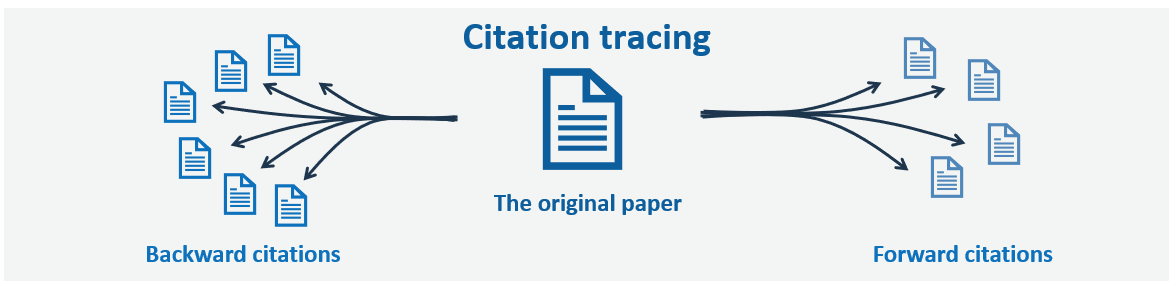
Citation Tracing – also called “snowballing” – is a normal component of Exploratory Searching. This popular approach relies on linking from a published paper to the sources cited within (Backwards citations) and to newer papers that have cited the paper (Forward citations). Citation Tracing is especially useful in the initial Exploratory stage of the searching process, or as a supplement in the end stage, to ensure that all the most important work is retrieved.
Advantages
- Intuitive and easy supplement to explore and identify additional relevant literature
- Sorting records based on number of citations gives you a quick overview of the most central contributions to the field.
Limitations
- Requires that your starting "seed paper" is highly relevant and well-oriented in the research literature
- Can be quite time consuming – especially if completeness is important
Literature mapping
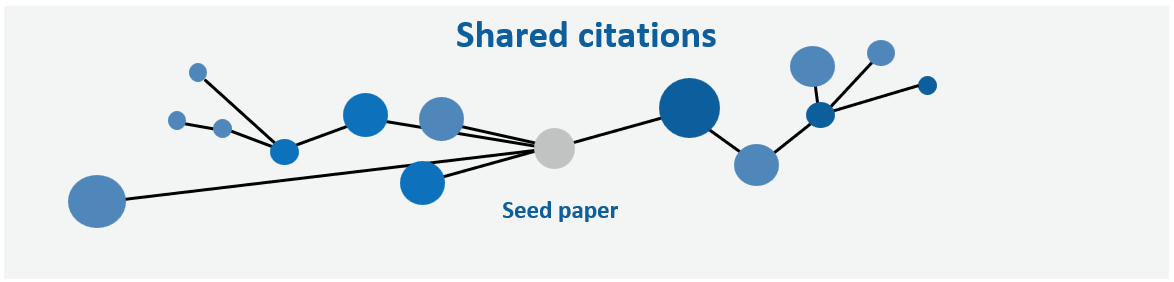
Literature mapping tools – like Connected Papers, Research Rabbit and Keenious – are examples of new citation analysis tools that go beyond direct links between paper and instead identify and visualize connected papers based on similarities in the profile of citations in the reference lists of papers.
Advantages
- Intuitive and quick supplement to identify additional relevant literature
- Independent of direct linkage between papers
Limitations
- Requires good “seed papers”
Access and support services at your library
Although much information, including scholarly publications, is openly available on the internet, many of the resources you will need are subscription-based. These are often made available to you by your library.
Databases at your library
The range of subscription databases offered through institution libraries varies - consult your local library for more information. Below we provide links to webpages with information about the databases offered via the libraries from collaborating institutions partners behind PhDonTrack. Subscription databases are accessible from everywhere on campus. When you are off campus, check with your institution to find out how you can connect through proxy or VPN technology.
NHH Norwegian School of Economics Library
UiT - The Arctic University of Norway Library
Western Norway University of Applied Sciences Library
Support services at your library
Visit your library website to learn about the services offered, such as courses and guidance in literature searching and reference management. Below we provide links to webpages with information about the support services offered via the libraries from the collaborating institutions behind PhDonTrack.
NHH Norwegian School of Economics Library